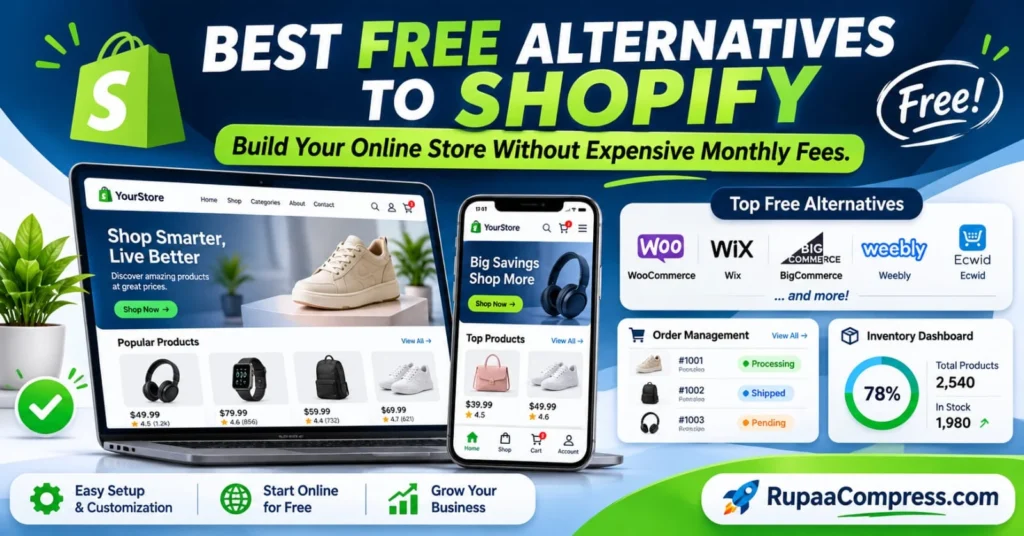
Risposta rapida: The best free alternatives to Shopify include WooCommerce, Wix, Weebly and other affordable e-commerce solutions. WooCommerce is particularly suitable for people who want an open-source platform without monthly software subscription fees. Wix offers free website creation, while BigCommerce and Ecwid provide paid plans and trial options. Your best choice depends on your budget, technical skills, location and business requirements.
Starting an online business does not necessarily mean paying expensive monthly subscription fees. Several e-commerce platforms allow entrepreneurs to create professional online stores with different levels of customization, product management and payment functionality.
In this guide, we explore the best Shopify alternatives in 2026, compare their features, explain their limitations and show you how to choose an affordable platform for your business.
Why Look for Free Alternatives to Shopify?
Shopify is a popular e-commerce platform because it combines website hosting, product management, payment integration and order processing in one system.
However, its subscription costs may become challenging for beginners who are still testing their business ideas. Additional expenses for applications, premium themes, domain registration and payment processing can increase the total operating cost.
For a new business, reducing these expenses can help preserve the budget for product development, marketing and customer acquisition.
There are several reasons why business owners explore alternative platforms.
1. Lower operating costs: Open-source platforms allow users to access essential e-commerce software without paying a monthly platform subscription.
2. More customization: Some alternatives provide greater control over website design, functionality and integrations.
3. Flexible hosting: Certain platforms allow businesses to choose their own hosting provider instead of depending on a single website-building company.
4. Better budget management: Starting with essential features and adding paid services when necessary can help control expenses.
However, remember that free software does not always mean a completely free online business. Hosting, domains, payment processing and premium extensions may still cost money.
Best Free Alternatives to Shopify in 2026
Choosing the right e-commerce platform depends on the size of your business, technical experience and the features you need.
Here are five popular alternatives worth considering.
1. WooCommerce – Best for Customization and Flexibility
WooCommerce is one of the most flexible alternatives for building an online store. It is an open-source e-commerce plugin designed for WordPress websites.
Unlike traditional hosted platforms, WooCommerce gives store owners considerable control over their website, products, database and design.
Its core software is free, and users can extend its functionality through additional plugins and themes.
Caratteristiche principali:
- Product and category management.
- Shopping cart and checkout functionality.
- Order management dashboard.
- Inventory and stock management.
- Multiple payment gateway integrations.
- Extensive WordPress plugin support.
- Customizable website themes.
Vantaggi:
- Free open-source core software.
- Extensive customization options.
- No additional WooCommerce platform transaction fee.
- Greater control over website data.
- Suitable for small and large product catalogs.
Limitazioni:
You need WordPress hosting and a domain to operate a public website. Website maintenance, security updates, backups and plugin compatibility are also your responsibility. Premium extensions and professional development can add further costs.
Ideale per: Entrepreneurs, WordPress users and businesses that want long-term customization and control.
Sito ufficiale: WooCommerce
2. Wix – Best for Beginners and Easy Website Design
Wix is a website builder that makes it easier to create professional websites without programming knowledge.
Its drag-and-drop editor allows users to customize website layouts, add product images, create landing pages and design storefronts.
Wix provides a free website creation option. However, accepting customer payments and using full e-commerce functionality requires an eligible paid plan.
Caratteristiche principali:
- Drag-and-drop website editor.
- Customizable website templates.
- Product galleries and product pages.
- Website hosting.
- Mobile-responsive designs.
- Business and marketing tools.
- E-commerce order management.
Vantaggi:
- Beginner-friendly interface.
- Easy website customization.
- No coding required for basic design.
- Hosting included with website plans.
Limitazioni:
The free plan is primarily suitable for creating and testing a website. You need to upgrade to an eligible plan to accept online payments. Premium features and some integrations also require additional costs.
Ideale per: Beginners, small businesses and entrepreneurs who prioritize simple website design.
Sito ufficiale: Wix
3. BigCommerce – Best for Growing Businesses
BigCommerce is a hosted e-commerce platform designed for businesses that need advanced online selling functionality.
It provides tools for managing products, processing orders and connecting different sales channels.
Unlike WooCommerce, BigCommerce includes hosting and platform management as part of its subscription service.
Caratteristiche principali:
- Product catalog management.
- Inventory management.
- Order processing.
- Multi-channel selling capabilities.
- Payment gateway integrations.
- Customizable storefronts.
- Business reporting tools.
Vantaggi:
- Designed for growing businesses.
- Advanced e-commerce functionality.
- Hosted platform with managed infrastructure.
- Useful integrations for online selling.
- Free trial for testing the platform.
Limitazioni:
BigCommerce is not a permanently free e-commerce platform. It offers a 15-day free trial, after which you need an eligible paid subscription to continue using its hosted store functionality.
Ideale per: Established businesses and entrepreneurs planning to expand their online sales operations.
Sito ufficiale: BigCommerce
4. Weebly – Best for Simple Website Creation
Weebly is a website-building platform known for its beginner-friendly editing experience.
It provides website creation tools, templates and e-commerce features through its platform. Weebly is part of the Square ecosystem, so its online store features and payment arrangements should be reviewed before starting a new business website.
Caratteristiche principali:
- Website templates.
- Drag-and-drop editing.
- Basic website customization.
- Product presentation.
- Website management tools.
- E-commerce features on eligible plans.
- Integration with Square services where supported.
Vantaggi:
- Simple website-building experience.
- Beginner-friendly editing tools.
- Suitable for straightforward websites.
- Free website option.
- E-commerce features available depending on the plan and region.
Limitazioni:
A free website plan does not necessarily provide every feature required to operate a professional online store. Check the current e-commerce features, payment availability and plan conditions in your country before committing.
For new businesses looking for a simple hosted store, Square Online is also worth evaluating.
Ideale per: Existing Weebly users and people maintaining simple websites.
Sito ufficiale: Weebly
5. Ecwid – Best for Adding an Online Store to an Existing Website
Ecwid by Lightspeed provides e-commerce functionality that can be added to an existing website.
Instead of rebuilding an entire website, businesses can integrate a store into their existing online presence.
This can be useful for bloggers, content creators and small businesses that already have a website.
Caratteristiche principali:
- Product catalog management.
- Online shopping functionality.
- Inventory management.
- Order processing.
- Payment provider integrations.
- Store integration with existing websites.
- Multiple sales channel integrations depending on the plan.
Vantaggi:
- Can integrate with existing websites.
- Does not require rebuilding an entire website.
- Straightforward store management.
- No additional transaction fees charged by Ecwid according to its pricing information.
Limitazioni:
Ecwid’s current direct plans are paid. Do not assume that a permanent free plan is available for new direct sign-ups. Product limits, integrations and additional features depend on the selected subscription.
Ideale per: Small businesses that already own a website and want to add online shopping functionality.
Sito ufficiale: Ecwid
Shopify Alternatives Compared: Which Platform Should You Choose?
Before selecting an e-commerce platform, compare its pricing model, customization options, technical requirements and business features.
The following table provides a simplified comparison.
| Platform | Free Option | Ease of Use | Personalizzazione | Best For |
|---|---|---|---|---|
| WooCommerce | Free core software | Moderate | Very High | Flexible online stores |
| Wix | Free website plan | Easy | High | Beginners |
| BigCommerce | 15-day free trial | Easy | High | Growing businesses |
| Weebly | Free website option | Easy | Moderate | Simple websites |
| Ecwid | Standard direct plans are paid | Easy | Moderate | Existing websites |
Importante: Free-plan availability and features can change. Check each platform’s official pricing page before registering.
Which Platform Is Best for Your Business?
The right platform depends on what you are trying to achieve.
Choose WooCommerce if:
- You want more control over your website.
- You already use WordPress.
- You need extensive customization.
- You are comfortable managing hosting and updates.
Choose Wix if:
- You are creating your first website.
- You prefer drag-and-drop editing.
- You want an easy website-building experience.
- You are comfortable upgrading when you need payment functionality.
Choose BigCommerce if:
- You have an established business.
- You need advanced e-commerce features.
- You have a budget for a hosted platform.
Choose Ecwid if:
- You already have a business website.
- You want to add product listings and checkout functionality.
- You prefer not to rebuild your entire website.
Consider Weebly or Square Online if:
- You need a simple website.
- You already use Square services.
- You want to explore beginner-friendly website management.
Essential Features to Look for in an E-Commerce Platform
Selecting a platform based only on its subscription price can create problems later.
Before building your store, consider the following essential features.
1. Easy Setup and Customization
A good platform should make it easy to create product pages, organize categories and customize the homepage.
Beginners should prioritize intuitive editing tools, responsive templates and straightforward navigation.
A professional website should also maintain a consistent appearance across desktop computers, tablets and smartphones.
2. Product and Inventory Management
Inventory management helps business owners monitor available products and avoid selling items that are out of stock.
Look for features that allow you to:
- Add and edit products.
- Organize product categories.
- Update stock quantities.
- Manage product variations.
- Track available inventory.
For businesses selling physical products, accurate inventory information is particularly important.
3. Order Management
An effective order management dashboard helps store owners track purchases and manage fulfillment.
Useful order statuses include:
- Pending payment.
- Processing.
- Completed.
- Shipped.
- Cancelled.
- Refunded.
Check whether the platform supports the order workflows required by your business.
4. Payment Gateway Support
Your customers need a convenient way to pay for their purchases.
Before selecting a platform, check which payment providers are supported in your country.
For example, businesses operating in Sri Lanka should investigate local payment gateway availability, settlement arrangements and supported currencies before launching their stores.
Do not assume that every international payment service is available in every country. Confirm that the payment gateway supports your business location and the countries where you intend to sell.
5. Mobile-Friendly Storefronts
Many customers browse online stores using smartphones.
Your website should display product photographs, descriptions, prices and checkout information clearly on smaller screens.
Test your website on different devices before making it publicly available.
How to Build Your Online Store Without Expensive Monthly Fees
Once you have selected a suitable platform, follow these steps to establish your online business.
Step 1: Choose Your E-Commerce Platform
Start by identifying your business requirements.
If you want complete control and already use WordPress, WooCommerce is a practical starting point.
If you prefer a beginner-friendly website builder, consider Wix. Compare the actual costs before choosing a platform.
Step 2: Register Your Domain and Configure Hosting
Your domain is the address customers use to access your website.
For WooCommerce, you need a suitable WordPress hosting provider and domain name.
Compare hosting storage, bandwidth, SSL certificates, backups and customer support before purchasing a hosting package.
Hosted platforms generally include hosting within their subscriptions.
Step 3: Design Your Online Store
Create a homepage that clearly communicates what your business sells.
Add essential pages such as:
- Home.
- Shop.
- About Us.
- Contact.
- Shipping Policy.
- Return and Refund Policy.
- Privacy Policy.
Use consistent fonts, colors and navigation menus throughout your website.
Step 4: Upload and Optimize Product Images
Product photography is an important part of the online shopping experience.
Large image files can increase page loading times, especially for customers using slower internet connections.
Before uploading product photographs, consider:
- Resizing images to suitable dimensions.
- Compressing large image files.
- Using modern image formats such as WebP where supported.
- Writing descriptive image filenames.
- Adding meaningful alternative text.
- Maintaining consistent product image dimensions.
You can use browser-based image utilities such as RupaCompress to prepare product images before adding them to your catalog.
Step 5: Configure Payments and Shipping
Configure the payment methods available for your target customers.
Next, establish your shipping methods, delivery charges and estimated delivery times.
If you sell internationally, investigate customs requirements, taxes and international shipping restrictions.
Always perform a test order to confirm that the checkout and order notification processes work correctly.
Step 6: Launch and Promote Your Store
Before launching, check that your website works correctly on desktop and mobile devices.
Test product links, checkout functionality, contact forms and shipping information.
After publishing, promote your store through search engine optimization, social media and relevant marketing channels.
Monitor website traffic, customer behavior and sales performance to identify areas for improvement.
Common Mistakes When Choosing a Free E-Commerce Platform
Avoid these mistakes when building your online store.
1. Assuming everything is free: Free software may still require paid hosting, domains and extensions.
Correzione: Calculate the total operating cost before choosing.
2. Ignoring payment gateway availability: A platform may support payment services that are unavailable in your country.
Correzione: Verify local payment support first.
3. Choosing a platform without checking limitations: Free plans may restrict products, storage or customization.
Correzione: Read the official plan comparison.
4. Uploading oversized product images: Large images can negatively affect loading performance.
Correzione: Resize and compress images before uploading.
5. Ignoring mobile responsiveness: A website that works on desktop may display poorly on smartphones.
Correzione: Test important pages on mobile devices.
6. Installing too many plugins: Unnecessary plugins can increase maintenance requirements and create compatibility issues.
Correzione: Install only the extensions your business needs.
7. Forgetting website security: Outdated software and weak passwords can expose websites to security problems.
Correzione: Use strong passwords, regular updates, backups and HTTPS.
8. Ignoring future business growth: A platform suitable for ten products may not meet the requirements of a much larger catalog.
Correzione: Check product limits, migration options and upgrade costs before committing.
Domande frequenti (FAQ)
1. What are the best free alternatives to Shopify?
WooCommerce is one of the strongest free alternatives because its core software is open-source and offers extensive customization. Wix and Weebly also allow free website creation, although their free options have limitations for commercial e-commerce. Other platforms, such as BigCommerce, offer free trials rather than permanent free plans.
2. Can I build a fully functional online store for free?
You can build an online store using free software, but operating a fully functional commercial store without any expenses is difficult. Domain registration, hosting, payment processing and additional services may involve costs. WooCommerce is a useful starting point if you want to avoid a platform subscription.
3. Is WooCommerce better than Shopify?
WooCommerce is better for users who want customization, open-source flexibility and control over hosting. Shopify is generally easier to manage because it provides an integrated hosted environment. The better option depends on your technical knowledge, budget and preferred website management approach.
4. Can I use Wix to sell products without paying?
Wix allows users to create and publish websites using its free plan. However, accepting customer payments requires upgrading to an eligible e-commerce plan. You can design and test your website before deciding whether to purchase a subscription.
5. Is BigCommerce completely free?
No. BigCommerce provides a 15-day free trial rather than a permanent free e-commerce plan. Businesses need an eligible paid subscription to continue using its hosted e-commerce services after the trial. Review the official BigCommerce pricing page for current subscription options and conditions.
6. Which Shopify alternative is best for beginners?
Wix is a beginner-friendly option because of its drag-and-drop editor and website templates. WooCommerce is another good choice for beginners who want greater control and are willing to learn WordPress. Consider your budget, hosting requirements and payment gateway availability before making a decision.
Conclusione
Finding the best free alternatives to Shopify can help entrepreneurs reduce their initial website expenses and establish an online business with greater financial flexibility.
WooCommerce is an excellent option for customization, while Wix offers an accessible starting point for beginners. BigCommerce provides a trial for businesses that want to explore a hosted e-commerce platform, while Ecwid can add store functionality to an existing website.
Compare the features, payment options and actual operating costs before choosing your platform. Start with the essential features and expand your store as your business grows.