Have you ever searched for a product online and then noticed advertisements for the same product appearing on completely different websites? This is not always a coincidence. Many websites and advertising services use browser tracking technologies to understand how people interact with online content.
Every time you visit a website, click a link, browse a product, or interact with an online service, certain information may be collected. This information can help websites remember your preferences, measure visitor activity, improve their services, and display personalized advertisements.
However, the same technologies can also raise important privacy concerns. Extensive tracking may allow companies to build detailed profiles of browsing behaviour, shopping interests, and online preferences.
Understanding how browser tracking works is an important step toward controlling your digital footprint and protecting your personal information.
In this guide, you will discover how tracking cookies, analytics scripts, browser fingerprinting, and advertising technologies work, why website tracking matters for privacy, and how to adjust your browser settings to reduce unnecessary tracking. You will also learn about practical privacy-conscious image processing tools available through RupaaCompress.
1. How Does Browser Tracking Work? Understanding the Technology Behind Website Tracking
Browser tracking refers to the methods websites, advertising networks, and other online services use to collect information about visitors and their interactions.
When you open a website, your browser communicates with the website’s server and may also load additional resources from analytics providers, advertising networks, and other third-party services.
Depending on the website and your privacy settings, these services may collect information about your visit.
Several technologies contribute to this process.
Tracking Cookies
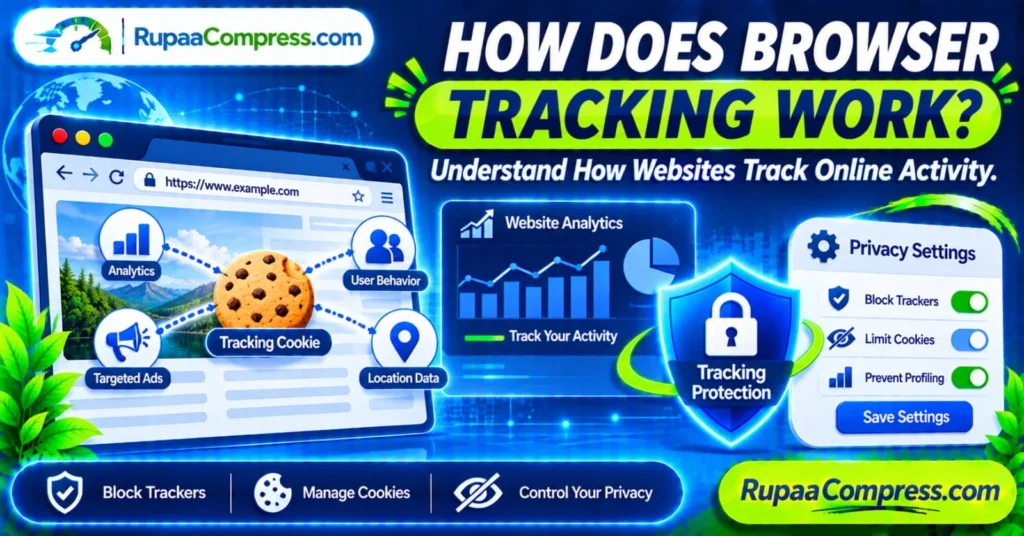
Cookies are small pieces of information that websites store in your browser.
They can serve useful purposes, such as remembering login sessions, language preferences, shopping carts, and other website settings.
However, cookies can also support tracking.
For example, an advertising service may use cookies to recognize a browser across different websites where its tracking technology is installed.
There are two common categories:
First-party cookies: These are created by the website you are visiting. They commonly support login sessions, preferences, and website functionality.
Third-party cookies: These are associated with services other than the website you are directly visiting. They may be used for advertising, analytics, and cross-site tracking, depending on the implementation and browser settings.
Not every cookie is used for advertising. Understanding the difference between essential website cookies and tracking cookies is important when managing your privacy.
Website Analytics Scripts
Many websites use analytics tools to understand how visitors interact with their pages.
These tools may collect information such as:
- Pages visited.
- Time spent on particular pages.
- Referral sources.
- Browser and device information.
- Button clicks and other interactions.
- General website usage patterns.
Website owners use this information to identify popular content, improve navigation, and understand visitor behaviour.
Analytics services differ in what they collect and how they process information. Some use cookies, while others rely on other measurement techniques.
Tracking Pixels and Embedded Resources
Tracking pixels are small tracking elements that can be embedded in webpages, advertisements, and emails.
They can help determine whether particular content has been viewed or whether an advertising campaign has generated an interaction.
For example, an advertising platform may use tracking technologies to measure conversions after someone visits a website and makes a purchase.
These systems can provide useful marketing statistics, but they may also contribute to broader online activity monitoring.
Browser Fingerprinting
Browser fingerprinting is another technique used to recognize or distinguish browsers.
Instead of relying entirely on cookies, fingerprinting systems may examine combinations of technical characteristics, including:
- Browser type and version.
- Operating system.
- Screen dimensions.
- Language settings.
- Time zone.
- Available browser features.
- Certain graphics and hardware characteristics.
When combined, these characteristics may create a distinctive browser fingerprint.
This means deleting cookies alone does not necessarily eliminate all forms of tracking.
IP Addresses and Location Information
Websites and online services can usually see the public IP address associated with a connection.
IP addresses may provide approximate geographic information, such as a country, region, or city.
Some websites may also request access to more precise location information through browser permissions.
Importantly, ordinary website visits do not automatically give every website access to your device’s precise GPS location.
Reviewing location permissions is therefore an important part of managing browser privacy.
2. Why Website Tracking Can Affect Your Online Privacy
Website tracking is not automatically harmful. It supports important functions such as security monitoring, website analytics, personalized experiences, and advertising measurement.
However, extensive or poorly controlled tracking can create privacy concerns.
Behavioural Profiling
Companies may use collected browsing information to understand user interests and predict preferences.
For example, repeatedly visiting pages about a particular product category may contribute to an advertising profile associated with your browser or account.
Depending on the information collected and combined, these profiles may reveal more about your interests than you expect.
Personalized and Targeted Advertising
Advertising networks may use browsing information to decide which advertisements to display.
For example, after researching a laptop, you might notice advertisements for computers, accessories, or related products on other websites.
This is one reason online advertising can appear closely connected to your recent browsing activity.
Personalized advertising is not necessarily dangerous, but some users prefer not to have their online behaviour used for this purpose.
Data Collection and Security Risks
Information collected by online services may be stored, processed, or shared with other organizations according to their privacy practices.
If a company experiences a security incident, stored personal information could potentially be exposed.
This is why it is important to understand what information a service collects and how it handles that information.
Reduced Control Over Personal Information
When multiple services collect browsing information, it can become difficult to understand exactly who has access to your data.
Privacy-conscious browsing involves reviewing website permissions, limiting unnecessary tracking, and choosing services with transparent data-handling practices.
3. How to Stop Websites from Tracking You and Improve Browser Privacy
You cannot eliminate every form of online tracking simply by changing one browser setting. However, you can significantly reduce unnecessary tracking by combining several privacy measures.
Step 1: Enable Browser Tracking Protection
Modern browsers provide built-in privacy and security settings.
For example:
Google Chrome
- Open Chrome Settings.
- Navigate to Privacy and security.
- Review Third-party cookies settings.
- Choose the available restrictions that match your privacy preferences.
- Review site permissions, including location and camera access.
Chrome’s available cookie controls may vary by version and configuration.
Mozilla Firefox
- Open Firefox Settings.
- Select Privacy & Security.
- Review Enhanced Tracking Protection.
- Choose an appropriate protection level.
- Review cookie and site permission settings.
Firefox provides tracking protection designed to block recognized tracking content.
Microsoft Edge
- Open Edge Settings.
- Navigate to Privacy, search, and services.
- Review Tracking Prevention.
- Select an appropriate protection level.
- Review site permissions and cookie settings.
Safari
- Open Safari settings.
- Select Privacy.
- Review cross-site tracking prevention.
- Check website privacy and location permissions.
The exact options may differ between desktop and mobile versions.
Step 2: Manage Cookies Regularly
Review the cookies stored by your browser and remove unnecessary website data.
You can also configure your browser to restrict third-party cookies where supported.
Remember that removing cookies may sign you out of websites and reset saved preferences.
Cookie restrictions can also affect website functionality, so check whether important websites continue working correctly.
Step 3: Review Website Permissions
Some websites request permission to access device features.
Common examples include:
- Location.
- Camera.
- Microphone.
- Notifications.
- Clipboard access.
Only grant these permissions when they are genuinely required.
For example, a weather website may need location access to provide local forecasts, but an unrelated website generally does not need continuous access to your location.
Step 4: Use Reputable Privacy Extensions
Browser extensions can provide additional protection against certain tracking scripts and unwanted advertisements.
Before installing an extension:
- Check its developer and reputation.
- Review its requested permissions.
- Read its privacy policy.
- Avoid unnecessary extensions.
- Install updates regularly.
Extensions with excessive permissions may introduce additional privacy risks, so choose carefully.
Step 5: Review Your Browser Privacy Settings Regularly
Browser privacy technologies change over time.
Make a habit of reviewing your browser settings, installed extensions, saved permissions, and website data.
Also keep your browser updated to receive security improvements and new privacy features.
4. Protect Your Digital Files with Privacy-Conscious Image Tools
Browser tracking is only one part of digital privacy.
The way you handle photographs, documents, and other personal files also matters.
For example, some online image editing websites require users to upload photographs to remote servers before processing them.
This may be unsuitable for people working with confidential client images, private photographs, or unpublished commercial assets.
Why Local Browser-Based Image Processing Matters
Some browser-based image tools use JavaScript and technologies such as the HTML5 Canvas API to process images directly on the user’s device.
When an individual tool genuinely performs processing locally, the original image does not need to be transmitted to an external image-processing server.
Potential advantages include:
- Reduced need for external image uploads.
- Convenient editing directly in a browser.
- No dependence on remote processing queues.
- Greater control over local image files.
- Convenient access without installing additional software.
RupaaCompress offers browser-based image utilities for tasks such as image compression, resizing, and other image-processing activities.
You can explore the available tools at RupaaCompress.com.
Always check the privacy information and actual processing behaviour of the individual tool before handling confidential files.
Prepare Your Images for Secure Online Publishing
If you manage a website, blog, or online store, image optimization is another useful part of your digital workflow.
Consider these practices:
Compress Images: Reduce unnecessary file sizes to improve website loading performance.
Resize Images: Choose dimensions appropriate for the intended website layout.
Choose Suitable Formats: Use modern ima