Images are an essential part of modern websites. Whether you manage a WordPress blog, an e-commerce store, a business website, or a digital publishing platform, high-quality images help communicate information, attract visitors, and improve the overall user experience.
However, simply uploading photographs to your website does not guarantee that they will appear in Google Images or contribute positively to your search engine optimization (SEO) strategy.
To get the most value from your visual content, you need to understand Image SEO.
Image SEO is the process of optimizing website images so that search engines can better understand their content, discover them through image search, and display them in relevant search results. It also involves improving image loading speed, accessibility, file size, and visual quality.
For website owners targeting competitive markets such as the United States, United Kingdom, Germany, Canada, and Australia, image optimization can be an important part of a comprehensive SEO strategy.
In this guide, you will learn how to optimize images for SEO, write effective image alt text, choose SEO-friendly filenames, compress images without losing quality, use modern image formats, and improve your website’s image search visibility.
You will also discover how free browser-based tools such as RupaaCompress can simplify your image optimization workflow while keeping your files on your device when using its local-processing tools.
What Is Image SEO?
Image SEO refers to optimizing images and their surrounding webpage content to help search engines understand, index, and potentially display visual content in relevant search results.
Search engines cannot interpret every visual detail in an image in the same way a human visitor can. They use information such as image filenames, alternative text (alt text), surrounding content, image captions, structured data, and other contextual signals to understand what an image represents.
A properly optimized image provides useful information to search engines while making a website more accessible and faster for visitors.
For example, consider a website publishing an article about landscape photography.
Uploading an image named IMG_20261108.jpg provides very little descriptive information.
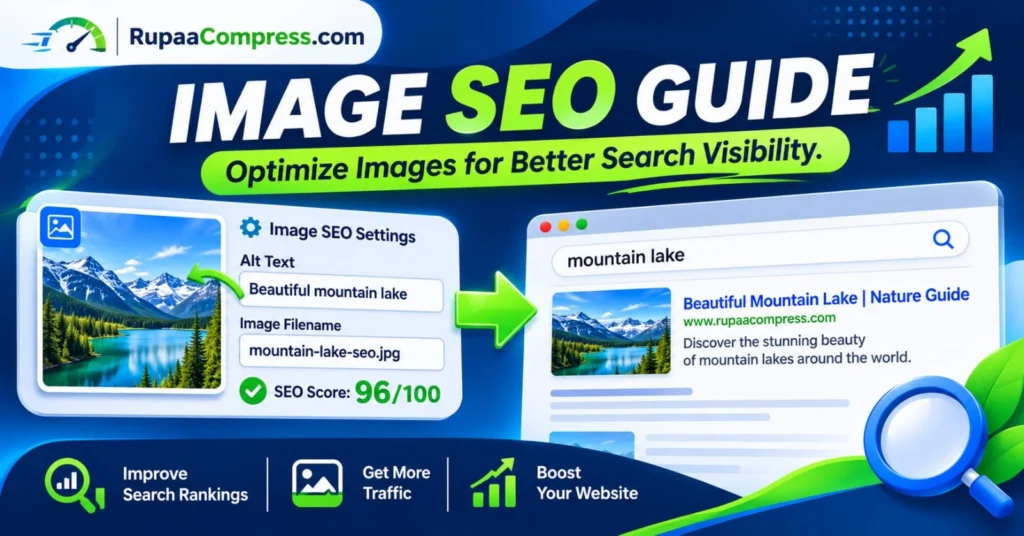
Renaming it to mountain-lake-landscape-photography.jpg gives search engines a clearer indication of its subject.
When combined with meaningful alt text, appropriate image dimensions, and optimized file size, the image becomes better prepared for search discovery.
Why Is Image SEO Important for Website Rankings?
Image optimization is not just about making photographs look attractive. It can support several important aspects of website performance and organic search visibility.
1. Increase Visibility in Google Images
Google Images provides another opportunity for websites to attract organic visitors.
People frequently use image search to discover products, photography ideas, tutorials, design inspiration, travel destinations, and visual guides.
When your images are relevant, accessible, and properly optimized, they may become eligible to appear in relevant Google Images results.
For example, a website publishing a guide about website design could attract additional visitors through searches related to website layouts, design examples, and image optimization.
2. Improve Website Loading Speed
Large image files can significantly increase webpage loading times.
A website containing multiple uncompressed photographs may take longer to load, particularly for visitors using mobile devices or slower internet connections.
Image compression reduces unnecessary file size while maintaining an acceptable level of visual quality.
Faster-loading pages can improve the user experience and support Core Web Vitals performance.
3. Improve Accessibility for Website Visitors
Alternative text helps people who use screen readers understand the purpose and content of images.
For example, someone who cannot see an image of a red sports car can understand its subject through descriptive alternative text.
Good alt text should describe the meaningful content of an image naturally rather than simply repeating search keywords.
4. Support Overall SEO Performance
Images contribute to the quality and usefulness of website content.
Relevant visual content, descriptive image information, appropriate placement, and fast loading speeds help create a better experience for visitors.
Although image optimization alone cannot guarantee higher rankings, it supports a stronger technical and content SEO strategy.
5. Improve E-commerce Product Discovery
For online retailers, product images are particularly important.
Customers often search for specific products using visual descriptions, colors, product categories, and design characteristics.
Optimized product photographs can improve image search opportunities and help potential customers discover relevant products.
7 Essential Image SEO Techniques You Should Follow
If you want to improve your Google Images visibility and optimize images for search engines, focus on these seven essential practices.
1. Use Descriptive, SEO-Friendly Image Filenames
Image filenames are one of the simplest elements to improve before uploading an image to your website.
Many photographs have automatically generated filenames from cameras, smartphones, and design applications.
Examples include:
DSC00245.jpgIMG_20261108.pngphoto-final-version.jpg
These filenames provide little meaningful information about the image.
Instead, use descriptive filenames that explain the image subject.
For example:
website-image-optimization-guide.jpgmountain-landscape-photography.webpmodern-office-interior-design.jpgwordpress-image-compression-guide.webp
Image filename SEO best practices:
- Use descriptive and relevant words.
- Separate words with hyphens.
- Keep filenames short and readable.
- Include the main subject naturally.
- Avoid unnecessary numbers and special characters.
- Do not repeatedly insert keywords into filenames.
A descriptive filename helps provide additional context about the image before it is uploaded.
2. Write Effective Image Alt Text
Alt text (alternative text) is one of the most important elements of image accessibility and image SEO.
It provides a textual description of an image for screen readers and helps search engines understand its content.
For example:
Poor alt text:
image123.jpg
Better alt text:
Mountain lake surrounded by green trees during sunrise
Another example for an e-commerce website:
Men's black leather casual shoes with white soles
When writing alt text, remember these principles:
- Describe what is actually visible in the image.
- Keep descriptions clear and natural.
- Include relevant keywords only when appropriate.
- Avoid keyword stuffing.
- Do not begin every description with phrases such as “Image of” or “Picture of”.
- Use empty alt attributes for purely decorative images when appropriate.
For WordPress users, you can add alternative text directly through the Media Library when uploading or editing an image.
Remember that alt text should describe the image’s purpose and content, not simply target a search keyword.
3. Compress Images Without Losing Important Visual Quality
Image compression is essential for reducing website page weight.
High-resolution photographs and large PNG files can increase loading times, especially on pages containing multiple images.
Image compression reduces the amount of data required to display an image while maintaining acceptable visual quality.
For example:
Original image: 2.5 MB
Optimized image: 350 KB
This represents a substantial reduction in file size while potentially maintaining a visually similar appearance.
The ideal compression level depends on the original image, its dimensions, file format, and intended use.
You can use RupaaCompress Image Compressor to compress images directly in your browser using its local-processing functionality.
This is useful for:
- WordPress blog images.
- E-commerce product photographs.
- Website banners.
- Social media graphics.
- Marketing materials.
- General website illustrations.
Reducing image file sizes helps minimize unnecessary page weight and can contribute to better loading performance.
4. Choose the Right Image Format: WebP, JPEG, or PNG
Choosing an appropriate image format is another important part of website image optimization.
Different formats serve different purposes.
WebP
WebP is a modern image format that supports lossy and lossless compression, transparency, and animation. It can provide smaller files than comparable JPEG or PNG images in many situations.
JPEG / JPG
JPEG is widely supported and suitable for photographs, landscapes, and other complex images.
PNG
PNG supports transparency and is useful for graphics, logos, screenshots, and images that require lossless quality.
AVIF
AVIF is a modern image format that can offer excellent compression efficiency. It is worth considering where browser compatibility and your website’s image delivery setup support it.
For many websites, WebP is a practical choice for everyday photographs and visual content.
However, the best format depends on the image itself and the requirements of your website.
5. Resize Images to the Correct Dimensions
Uploading an extremely large image and displaying it inside a small webpage container wastes bandwidth.
For example, if a blog displays an image at 800 pixels wide, uploading a 5000-pixel-wide photograph may be unnecessary.
Resize images to dimensions appropriate for their actual display size and responsive layouts.
Consider these general examples:
- Blog content images: 800–1200 pixels wide.
- Featured images: 1200 × 630 pixels.
- Product photographs: dimensions appropriate for your product gallery.
- Small icons: use appropriately sized SVG or raster graphics.
These are practical starting points rather than universal requirements.
Always consider high-density displays, mobile layouts, and responsive image delivery when choosing dimensions.
6. Add Relevant Captions and Surrounding Content
Search engines use the surrounding webpage content to understand the context of images.
Placing an image near a relevant heading and paragraph can help communicate its subject more clearly.
For example, if you are publishing an article about website speed optimization, a screenshot showing an image compression process should appear near the section discussing image compression.
You should also consider adding meaningful captions when they provide useful information to visitors.
Avoid placing unrelated photographs into an article simply to increase the number of images.
Every image should serve a purpose.
7. Use Responsive Images and Lazy Loading
Modern websites receive visitors from smartphones, tablets, laptops, and desktop computers.
Serving the same unnecessarily large image to every device can increase loading times and data consumption.
Responsive images allow browsers to select suitable image sizes based on the available display space and device requirements.
HTML attributes such as srcset and sizes help implement responsive image delivery.
Lazy loading can also improve initial page loading performance by delaying the loading of images that are outside the visible area.
For example, an image far below the first screen does not necessarily need to load immediately.
However, avoid lazy-loading your main above-the-fold or Largest Contentful Paint (LCP) image when doing so could delay its appearance.
How to Optimize Images for SEO: Step-by-Step Guide
Now that you understand the main image SEO techniques, follow this practical workflow before publishing images on your website.
Step 1: Select High-Quality Original Images
Start with a suitable original photograph or graphic.
Make sure the image is relevant to your article, product, or webpage.
Use images that you own, have permission to use, or have obtained from appropriately licensed sources.
Step 2: Rename Your Image Files
Before uploading images to WordPress or another content management system, replace generic filenames with descriptive names.
For example:
IMG_1234.jpg
Change it to:
website-image-seo-guide.jpg
This makes your media library easier to manage and provides useful image context.
Step 3: Resize and Compress Your Images
Visit RupaaCompress and use the available image compression and resizing tools.
Add your selected images to the browser workspace and choose suitable output settings.
Where local browser processing is used, the files are processed on your device rather than uploaded to a remote processing server.
Choose an appropriate compression level to balance image quality and file size.
Step 4: Convert Images to Modern Formats
Consider converting suitable photographs to WebP or AVIF.
For images that require transparency or specific compatibility, PNG may be more appropriate.
Always review the exported result to ensure the image still looks clear.
Step 5: Add Descriptive Alt Text
Upload your optimized image to WordPress.
Open the Media Library, select the image, and enter a meaningful description in the Alternative Text field.
For example:
Website image compression tool showing an optimized WebP photograph
Make sure the description accurately represents the actual image.
Step 6: Add Images to Relevant Sections
Insert images near the headings and paragraphs they support.
Use appropriate image dimensions and ensure that your images display correctly on desktop and mobile devices.
Step 7: Check Website Performance
After publishing your article, review its loading performance using tools such as Google PageSpeed Insights.
Check for oversized images, inefficient image formats, missing dimensions, and opportunities to improve image delivery.
You can also monitor Google Search Console to understand how your website performs in Google Search and discover potential indexing issues.
Common Image SEO Mistakes That Can Hurt Your Website
Even experienced website owners sometimes overlook basic image optimization practices.
Here are several mistakes worth avoiding.
Uploading oversized images: Large photographs can increase page weight and negatively affect loading performance.
Using generic filenames: Names such as image001.jpg provide little descriptive context.
Ignoring alt text: Missing or meaningless alt text can reduce accessibility and remove useful information about an image.
Keyword stuffing: Repeating the same target keyword in every image description creates unnatural text and does not guarantee better rankings.
Using irrelevant images: Images should support the actual topic of the webpage.
Ignoring mobile performance: Images should be optimized for different screen sizes and display conditions.
Lazy-loading the main hero image: Delaying the primary visible image can negatively affect the loading experience.
Ignoring image indexing: Incorrect robots directives, inaccessible image URLs, or technical website issues can prevent search engines from accessing images.
Avoiding these mistakes helps create a more efficient and search-friendly website.
Is Image Compression Safe for Private and Business Images?
Image optimization is important for bloggers, photographers, designers, digital marketers, and e-commerce businesses.
However, privacy should also be considered when choosing online image processing tools.
Some online services require users to upload photographs to external servers before processing them.
Depending on the provider’s policies and security practices, this may introduce additional privacy considerations.
For businesses handling unpublished product photographs, marketing designs, or confidential creative assets, understanding how an image tool processes files is particularly important.
Why Choose Local Browser-Based Image Processing?
Browser-based tools that use client-side processing can provide an alternative to conventional upload-based services.
RupaaCompress offers image utilities designed to process supported files locally in your browser.
Using its local-processing functionality:
- Images can be compressed without uploading them to a remote processing server.
- Supported images can be resized directly in your browser.
- Image formats can be converted locally.
- Files remain under your device’s control during processing.
- No separate software installation is required for supported browser tools.
This approach is particularly useful when working with private photographs and commercial visual assets.
Always check the processing method of the specific tool you are using, because not every online image service operates entirely on the client side.
Image SEO Checklist Before Publishing a Website Image
Use this checklist whenever you prepare images for a new blog post, landing page, or product listing.
- Select a relevant, high-quality image.
- Use a descriptive image filename.
- Separate filename words with hyphens.
- Write accurate and useful alt text.
- Resize the image to suitable dimensions.
- Compress the image without unacceptable quality loss.
- Choose an appropriate format such as WebP, JPEG, PNG, or AVIF.
- Add the image near relevant webpage content.
- Include width and height dimensions where appropriate.
- Use responsive image delivery.
- Apply lazy loading to suitable below-the-fold images.
- Check mobile display quality.
- Review website loading performance.
Following this checklist consistently can help establish a reliable image optimization workflow.
Frequently Asked Questions About Image SEO
1. What is the best image format for SEO?
WebP is an excellent choice for many website photographs because it supports efficient compression and transparency. JPEG, PNG, and AVIF can also be suitable depending on the image and website requirements. Google does not require one specific image format for ranking.
2. Does image alt text help with Google rankings?
Alt text helps search engines understand image content and improves accessibility for people using screen readers. It can also help images become eligible for relevant image search results. Write descriptive alt text naturally rather than inserting unnecessary keywords.
3. How do I optimize images for Google Images?
Use descriptive filenames, meaningful alt text, relevant surrounding content, appropriate image formats, and accessible image URLs. Make sure search engines can crawl your images and that the images provide genuine value to visitors.
4. Does image compression improve SEO?
Image compression reduces file size and can improve loading performance. Faster pages can provide a better user experience and support Core Web Vitals. However, compression alone does not guarantee higher Google rankings.
5. What is the ideal image size for a blog post?
There is no single ideal image size for every blog. A featured image of approximately 1200 × 630 pixels is a practical starting point for many websites. Other images should be resized according to their actual display dimensions and responsive layout requirements.
6. Should I use keywords in image filenames?
Yes, when the keywords accurately describe the image. For example, wordpress-image-optimization.jpg is more descriptive than IMG001.jpg. Keep filenames natural, relevant, and easy to understand.
7. Can I optimize multiple images at once?
Yes. Batch image processing can help website owners compress and resize multiple images more efficiently. It is particularly useful for e-commerce stores, large WordPress media libraries, and websites publishing content regularly.
8. Is it safe to use free online image compressors?
It depends on how each service processes and handles uploaded files. Tools that perform image processing locally in the browser can reduce exposure associated with transferring files to remote processing servers. Always review the privacy information and processing method of the service.
Conclusion: Build a Better Image SEO Strategy in 2026
Image SEO is an important part of creating a search-friendly website. From descriptive filenames and accurate alt text to image compression, modern file formats, and responsive delivery, every optimization step contributes to a better visual experience.
For bloggers, WordPress website owners, e-commerce businesses, and digital marketers targeting the United States, United Kingdom, Germany, and other international markets, properly optimized images can create additional opportunities to attract organic search visitors.
Remember that successful image SEO is not about inserting as many keywords as possible. It is about providing useful visual content, making images accessible, improving loading performance, and helping search engines understand what your images represent.
Ready to prepare your images for better website performance?
Visit RupaaCompress to explore free browser-based tools for image compression, resizing, and format conversion. Optimize your visual content, reduce unnecessary image file sizes, and build a more efficient website without unnecessary software installations.
You can also explore more practical tutorials and image optimization tips on the RupaaCompress Blog.