US Visa & DS-160 Photo Requirements: Complete Guide to Resizing Your Visa Photo
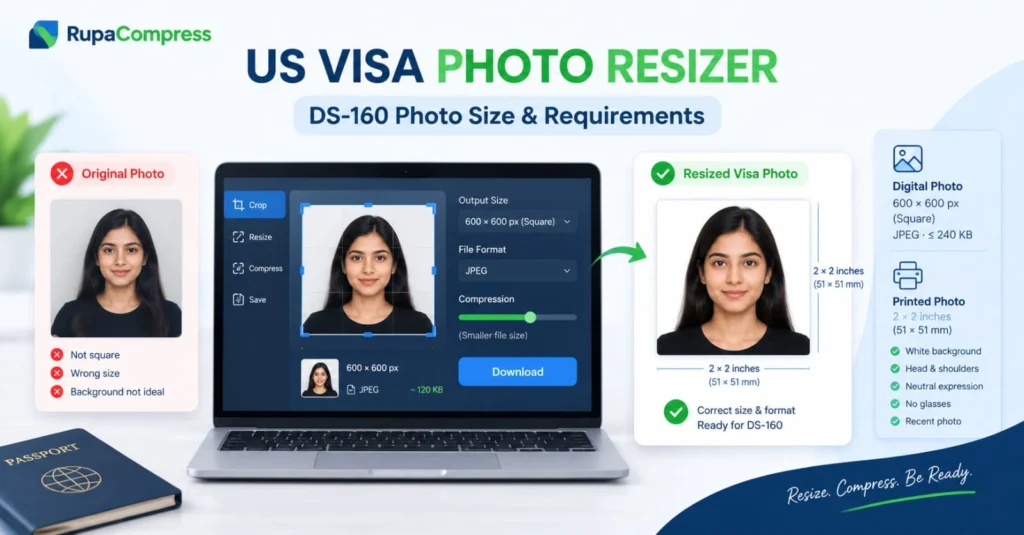
Applying for a United States nonimmigrant visa whether for tourism, business, study, or cultural exchange is a detailed process that begins with filling out the online DS-160 application form. While applicants spend hours carefully filling out travel histories, employment records, and personal details, thousands of submissions face unnecessary processing delays or digital rejection right at the final step: the visa photo upload. The US Department of State enforces exceptionally rigid technical specifications for digital visa photographs. If your image fails to meet the exact pixel dimensions, aspect ratio, file format, or maximum file size, the DS-160 portal may flag the upload with an error, preventing you from completing your application. As illustrated in our featured guide above, taking a standard portrait photo that is not square, the wrong size, or has a distracting background may cause rejection. To meet the digital requirements, your image generally needs to be transformed into a 600 × 600 pixel square JPEG file under 240 KB, featuring a neutral expression, white background, and no glasses. In this comprehensive guide, we will break down the exact DS-160 photo specifications, the risks of using unsafe third-party cloud croppers, and a step-by-step method to use a US visa photo resizer securely and for free right inside your web browser. For the latest official requirements, visit the US Department of State’s Photo Requirements page.
The Strict Technical Requirements for DS-160 Visa Photos
When you upload a digital photograph to the Consular Electronic Application Center (CEAC) portal for Form DS-160, automated checks evaluate whether your file meets the applicable requirements.
1. Exact Pixel Dimensions and Aspect Ratio: Your digital image must be square, with a 1:1 aspect ratio. The required dimensions are at least 600 × 600 pixels and no more than 1200 × 1200 pixels. A 600 × 600 pixel image is a convenient target for digital uploads. The standard physical US visa photograph measures 2 × 2 inches (51 × 51 mm).
2. File Format and Size Limits: The image should be saved as a standard JPEG (.jpg or .jpeg) file no larger than 240 KB. PNG, WebP, and HEIC files may not be accepted by the DS-160 upload system, so convert them to JPEG when necessary. Uploading a large 5 MB smartphone photo can cause a file-size error.
3. Composition and Visual Guidelines: The background must be plain white or off-white, without patterns, textures, or shadows. Your head must face the camera directly and remain centred vertically and horizontally. Head height from the bottom of the chin to the top of the head—must occupy approximately 50%–69% of the image’s total vertical height. Maintain a natural neutral expression or an acceptable subtle smile, with both eyes open and your mouth closed. Glasses are generally not permitted except in limited circumstances supported by the required medical documentation. The photograph must have been taken within the last six months and accurately reflect your current appearance. Always confirm the latest specifications on the official US visa photo requirements page.
The Privacy Risk of Using Random Online Croppers
When applicants discover that their photo has the wrong dimensions, the instinct is to search Google for a “free online passport photo maker,” upload their biometric portrait to an unknown website, crop it, and download the result. This convenience carries potential privacy and security risks. Your visa photograph contains sensitive biometric facial data, personal identity markers, and potentially embedded smartphone GPS location coordinates. Uploading biometric portraits to unverified third-party cloud servers may mean your private identity information is transferred to remote systems outside your control. The secure solution is to use a browser-based tool that genuinely processes images locally on your device, such as the relevant client-side utilities available at RupaaCompress. Modern web technologies, including client-side JavaScript and the HTML5 Canvas API, can process images entirely within your browser. Zero Server Uploads: When the tool operates locally, your biometric visa photo does not need to leave your device. Complete Privacy: The image is not sent to a remote database or cloud server for processing. Instant Precision: Cropping, resizing, and compressing can happen immediately without upload queues or server delays. However, verify the tool’s actual processing behaviour and privacy policy rather than assuming every online image editor works locally.
Step-by-Step Guide: How to Format Your DS-160 Photo Using a US Visa Photo Resizer
Step 1: Capture a Clean Source Photo. Stand against a plain white or light-coloured wall with natural, even lighting. Ensure there are no harsh shadows behind your ears or under your chin. Remove your glasses and maintain a neutral expression. Keep a backup copy of your original, unedited file.
Step 2: Crop to a 1:1 Square Aspect Ratio. Head over to the RupaaCompress Crop Image tool, or use the relevant crop functionality available on the website. Select your source photo in the browser workspace and choose the 600 × 600 px square or 1:1 aspect ratio preset, if available. Use the nine-point position controls, if provided, to centre your face, eyes, and shoulders within the guidelines.
Step 3: Resize to Exact 600 × 600 Pixels. Once your photo is cleanly cropped into a square, open the RupaaCompress Resize Image tool and set the output dimensions to 600 × 600 pixels. This produces a digital image within the permitted dimension range.
Step 4: Set Format to JPEG and Compress Under 240 KB. Open the RupaaCompress Compress Image tool, select JPEG as the output file format, and adjust the compression slider until the file is comfortably below 240 KB. You can aim for approximately 120 KB to 200 KB while maintaining good visual clarity. For additional guidance, see the relevant tutorial on compressing images to 100 KB or less. If an interactive before-and-after preview is available, inspect your facial features to ensure that your eyes and skin texture remain sharp.
Step 5: Download and Submit on DS-160. Download your final resized visa photo to your computer and upload it through the official CEAC DS-160 application portal. If the processing occurred entirely in your browser, the photo does not need to be uploaded to RupaaCompress’s servers.
Pro tips for passing photo validation: Check for glare and shadows, even after removing glasses. Diffused natural window light can help. Avoid heavy retouching, filters, and excessive skin smoothing because your skin texture and hair should look natural. Before uploading, rename the file with a clean filename such as us-visa-photo-ds160.jpg, avoiding random camera serial numbers. A clean filename helps you identify the file but does not affect official approval.
Frequently Asked Questions (FAQs)
1. What are the exact dimensions for a US visa photo? A digital US visa photo must be square (1:1 aspect ratio), with dimensions between 600 × 600 pixels and 1200 × 1200 pixels, saved as a JPEG file no larger than 240 KB. Check the official US Department of State photo requirements before submitting.
2. Can I wear head coverings in a US visa photo? Head coverings worn daily for religious or medical purposes may be permitted, provided they do not obscure any portion of your face from the tip of your chin to the top of your forehead and your face remains clearly visible without shadows. Review the official requirements for additional conditions.
3. Are online browser-based photo resizers safe for biometric visa documents? They can be a privacy-conscious option if they use client-side local processing through technologies such as the HTML5 Canvas API and do not upload your image to an external server. The relevant RupaaCompress image tools can help with cropping, resizing, and compression where those features are available. Verify the tool’s processing behaviour and privacy information before handling sensitive photographs. Following these steps can help you avoid preventable technical upload errors, but correctly resizing an image does not guarantee that the photograph will be accepted or that a visa will be approved. Always consult the latest official requirements before submitting Form DS-160.